Achieve cinematic quality with this videography app
Blackmagic Camera is a free multimedia app that brings the power of Blackmagic Design's award-winning cinema cameras to your smartphone. It offers features essential for professional-level videography, making it suitable for creating video content like documentaries and films. The app pushes the limits of what traditional smartphone cameras can achieve.

Unlock your creativity with Adobe Stock
Get 10 images or 1 video with a free trial
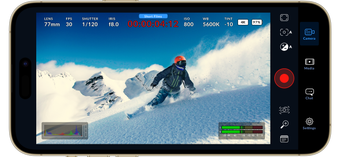
Initially, Blackmagic Camera’s layout might seem overwhelming, but its tap-to-adjust settings make it user-friendly. For an unobstructed view, users can swipe upwards to hide the heads-up display (HUD). This video-recording app offers a comprehensive feature set that’s easy to use for those familiar with professional camera settings.
Professional-grade features
Blackmagic Camera offers a range of advanced features that enhance video quality and the shooting experience. Users can easily adjust settings like frame rate, shutter angle, white balance, and ISO. The HUD provides comprehensive information, including status indicators, timecode, ISO levels, record parameters, focus peaking, and histograms. These features enable precise control over the filming process, ensuring every shot meets professional standards.
A standout feature of this app is its seamless integration with Blackmagic Cloud Storage, which facilitates the direct synchronization of media. To share a project with others, simply invite them using their Blackmagic ID. This functionality enables real-time collaboration with editors and colorists across the globe. Furthermore, it enhances workflows by providing a built-in chat feature, allowing project members to communicate and discuss ideas directly within the platform.
However, the app has an issue with reporting inaccurate available storage. Some users have noted significant discrepancies between what is shown in the app and the actual available space on their device. This can be a hassle, often requiring users to quickly transfer files to external storage solutions. Clearing the cache from other apps can temporarily free up some space, but this does not resolve the underlying issue.
High-quality filming on the go
In summary, Blackmagic Camera transforms your smartphone into a high-end film camera, perfect for both amateur and professional videographers. Its advanced features and intuitive interface offer precise control over video production, while integration with Blackmagic Cloud Storage enables seamless collaboration. Despite an issue with inaccurate storage reporting, the app remains a strong choice for those seeking high-quality mobile videography solutions.